
Pearl Crescent
Page Saver
Page Saver

Latest News
September 29th, 2017:
Page Saver 2.9.1 released.
Fixed a problem that prevented command line captures from working in Firefox 55 and 56.
Page Saver 2.9.1 released.
Fixed a problem that prevented command line captures from working in Firefox 55 and 56.

Screenshot of an Entire Page
Captured Using Page Saver
Captured Using Page Saver
Pearl Crescent Page Saver is an extension for Mozilla Firefox that lets you capture images of web pages, including Flash content. These images can be saved in PNG or JPEG format. Using Page Saver, you can capture an entire page, just the visible portion, or a region that you select. You can control the image capture process via a wide variety of settings, including the image file name and scale (e.g., save at 50% of original size).
Page Saver works with Firefox 36 – Firefox 56 on
Microsoft Windows, Mac OS X, and Linux x86, and should work on
all platforms where Firefox is available.
Page Saver has been translated into the following languages:
Page Saver has been translated into the following languages:
Chinese (Simplified), Chinese (Traditional),
Czech, Danish, Dutch, English, French, Galician, German, Greek, Hungarian,
Italian, Japanese, Korean, Polish, Portuguese (Brazil), Russian,
Slovak, Slovenian, Spanish (Spain), Swedish, Turkish, Ukrainian.
| Features | |
|---|---|
| Capture an entire page (without scrolling) or the visible portion of a page |
 |
| Capture the contents of a specific frame |
|
| Select and capture a region on a page (note: you cannot scroll the page during the capture) |
|
| Capture Flash content |
|
| Scale captured images to any desired percentage |
|
| Limit image size by maximum dimension |
|
| Save images to a local file (PNG or JPEG) |
|
| Save images to an HTTP (web) or FTP server |
|
| Place a copy of a captured image on the clipboard |
|
| Header and footer (record the URL of the captured page and other information) |
|
| User-defineable shortcut key |
|
| User-defineable file name pattern and related behaviors |
|
| Capture images from the command line (-saveimage flag) |
|
| Specify window width and height on the command line |
|
| Specify destination (file, URL, or clipboard) on the command line (-saveas flag) |
|
| Specify more options on the command line
(-saveoptions flag)
(including visible, useoriginalurl, maxwait=delay,
refreshmaxwait=delay,
flashdelay=delay, top=pixelval, left=pixelval,
bottom=pixelval, right=pixelval,
element=elementID, scale=scaleval,
format=imagetype and html) |
|
| Cost | No cost (contributions are appreciated) |
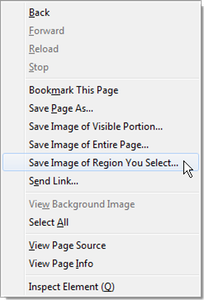
Browser Context Menu with
Page Saver Items
Page Saver Items
Help and Support
For assistance with Page Saver:
- Read the documentation.
- Check the list of known issues.
- Ask for help.
If you have comments about Page Saver, please send us feedback.
Copyright and License
Pearl Crescent Page Saver is
Copyright © 2005-2017 Pearl Crescent, LLC. Please
contact us if you are interested in
licensing the source code or if you want to redistribute the software.
Pearl Crescent Page Saver may be used in packaged, binary form for any legal purpose at no cost. The software is provided "as-is" and Pearl Crescent makes no other warranties with respect to its quality, performance, or fitness for any particular purpose.
Pearl Crescent Page Saver may be used in packaged, binary form for any legal purpose at no cost. The software is provided "as-is" and Pearl Crescent makes no other warranties with respect to its quality, performance, or fitness for any particular purpose.
Subscribe to our announcement list.